Designing patterns for the LED matrix
A small tool for designing light patterns for the LED matrix and seeing them on screen and on the real LEDs at the same time.
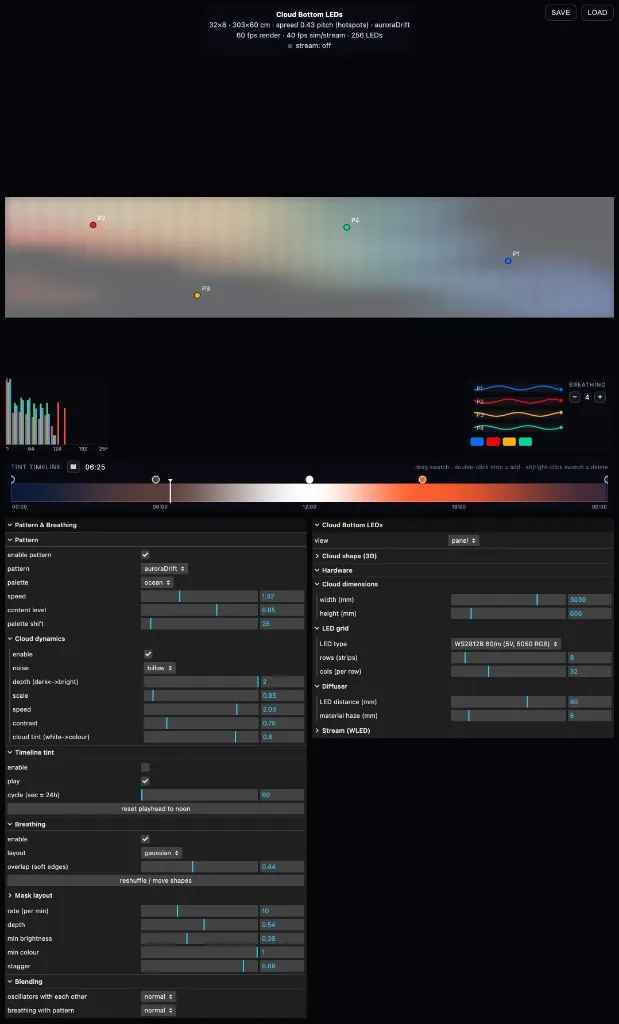
Playing with the LED matrix made us want a quicker way to try out patterns, so Michael vibe-coded a small tool for designing them: Cloud Bottom LEDs.
Vibe coding, describing what you want to an AI and letting it write the code, made it very easy to try out different LED designs very quickly. A new pattern, a breathing layout or an extra control was a short conversation away, so ideas could be tried on screen and on the real LEDs within minutes instead of hours. That speed mattered more than polish: most designs were thrown away, and the few that felt right could be explored further.
Patterns, breath and time of day
The tool shows the LEDs glowing behind a soft cloud surface, with patterns playing across them: plasma, waves, twinkle, fire, aurora, rain. A breathing layer splits the cloud into two to six regions, each with its own colour and a slow, staggered pulse. Regions can be columns, rings, soft blobs, or a mask you draw yourself, and a small oscilloscope shows each one breathing. A tint timeline colours the whole cloud through a day, from night blue through orange dawn to white noon and back.
The same frames on real LEDs
The pattern engine computes one colour for every LED, every frame. Those same colours drive the on-screen preview and are streamed live to real LED strips through a WLED controller, so a pattern designed on screen can be checked on the hardware straight away.
It is only an approximation, though. The colours of the LEDs and the colours on the screen don’t match perfectly, and there is some latency between the two. But it helps to visualise what is there.
Modelling diffusion, and doing it by eye
Michael also tried to model the diffusion. The tool takes the LED type and spacing, the distance from the LEDs to the diffuser, and the diffuser’s haze, and predicts whether you would see hotspots, soft dots or an even glow. In the end we didn’t trust it, and judged the distance and diffusion by eye on the real materials instead. So it became more of a design tool than a way to plan the build.